
Ads.txt Delegation
Ads.txt Delegation is a feature in the Clickio Platform that lets Clickio host and automatically maintain your ads.txt file. This removes the need for manual updates every time Clickio's lines change, while giving you full visibility and control over your other ad partner entries.
How It Works
When you enable delegation for a site, Clickio hosts a merged ads.txt file at a dedicated URL: https://adstxt.clickio.com/{yourdomain}/ads.txt
Your website's ads.txt then redirects to this URL. Clickio automatically keeps its lines up to date. You manage all non-Clickio lines directly in the Clickio Platform UI.
Key Benefits
- Automatic updates: Clickio lines are refreshed without any manual file edits.
- Reduced risk: one managed hosting point means fewer broken or outdated configurations.
- Revenue continuity: redirect monitoring detects issues before they impact demand.
- Flexibility: you still manage your non-Clickio partner lines yourself.
- Simpler support: fewer manual interventions needed for routine ads.txt maintenance.
How to Enable Ads.txt Delegation
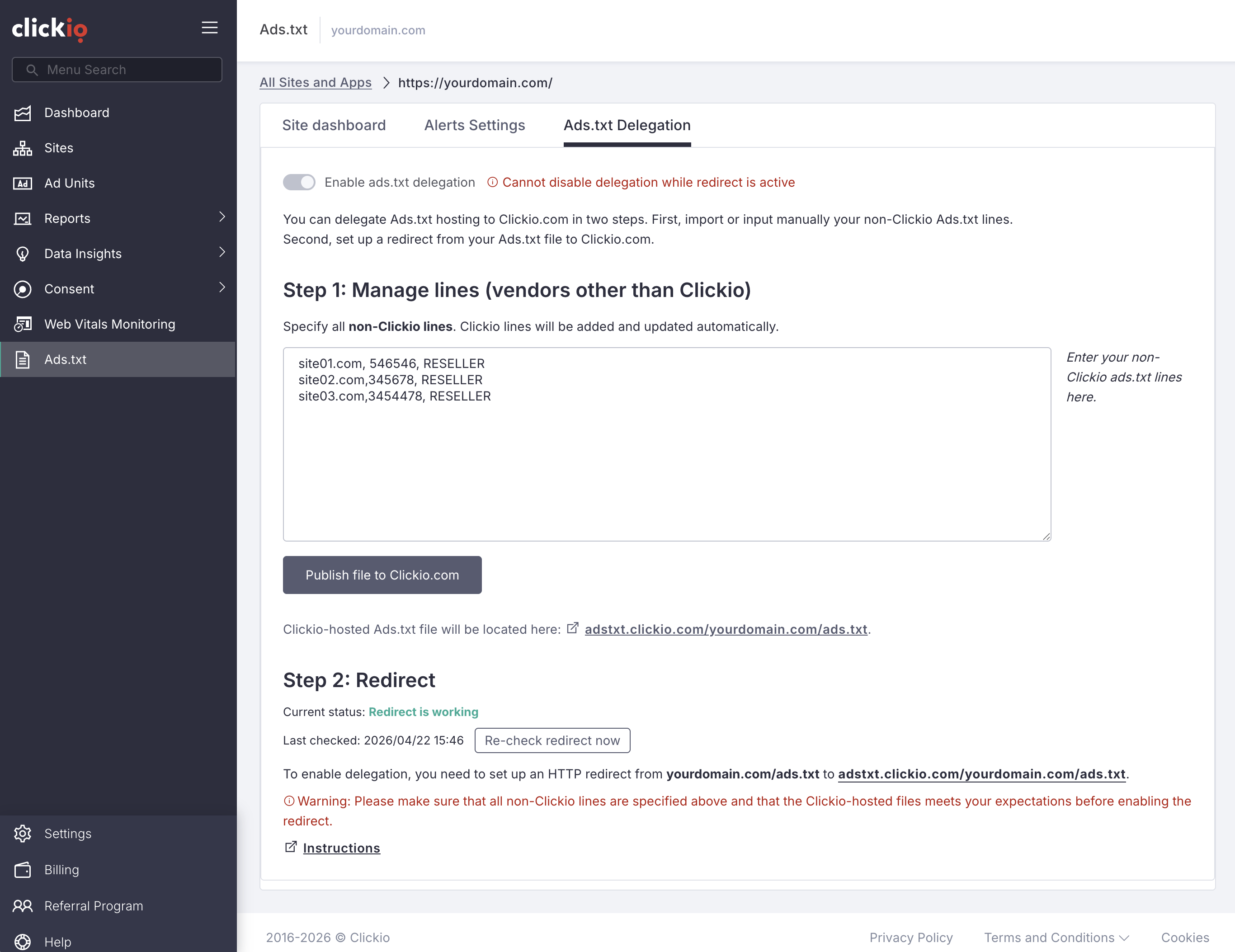
1. Open the Ads.txt Delegation tab in your Ads.txt section on the Clickio Platform.
2. Click Enable ads.txt delegation for the site you want to manage.
3. Import your current ads.txt, Clickio will automatically extract any non-Clickio lines.
4. Review and edit your non-Clickio lines (e.g., Google AdSense) in the text field provided.
5. Click Publish file to Clickio.com to merge all lines into the Clickio-hosted file at https://adstxt.clickio.com/{yourdomain}/ads.txt
6. Set up a redirect from your domain's ads.txt to the Clickio-hosted URL. Instructions will be shown in the platform.
7. Return to the Ads.txt Delegation tab, click on the button Re-check redirect now and confirm the redirect status shows as Redirect is working.
TIP: During the import step, Clickio automatically separates your existing lines into Clickio-managed and non-Clickio entries. You only need to review and edit the non-Clickio lines.
Managing Non-Clickio Lines
After enabling delegation, you can update your non-Clickio ad partner lines at any time directly in the Clickio platform, no file uploads required. The platform maintains a version history so you can review and restore previous configurations if needed.
How to Set Up the Redirect
Once delegation is enabled, you need to configure a redirect from your domain's ads.txt to the Clickio-hosted file. Step-by-step instructions are available in the separate guide: How to Set Up a Redirect for the ads.txt File.
Frequently Asked Questions About Delegation
Does delegation affect my non-Clickio ad partner lines?
No. You continue to manage all non-Clickio lines yourself through the Clickio Platform UI. Delegation only automates the Clickio-specific entries.
What happens if my redirect breaks?
Clickio monitors the redirect automatically. If a failure is detected, you will receive an alert and the Ads.txt Delegation tab will show a Redirect not found status. Restore the redirect on your server, then click Re-check redirect now in the Clickio UI.
Can I disable delegation later?
Yes. You can disable delegation at any time. You will then need to manage and host your own ads.txt file again.
Is Ads.txt Delegation available for app-ads.txt?
Currently, Ads.txt Delegation is available for website ads.txt files. Please check with your Clickio Account Manager for the latest availability.
For help with Ads.txt Delegation setup, contact your Clickio Account Manager or email support@clickio.com.